
OSLC Connect works with most single sign on solutions used with Jira.
If there are issues with connecting to Jira with Single Sign-On services, we can provide the following recommendations.
If your OSLC application (IBM ELM, for example) cannot connect (Friend) to Jira or experience authentication errors, it usually means that some rest endpoints are blocked.
The following URLs should be whitelisted in your SSO plugin.
-
jira_base_url/rest/oslc/1.0/rootservices
-
jira_base_url/rest/oslc/1.0/publisher
-
jira_base_url/rest/oslc/1.0/oauth/accessToken
-
jira_base_url/rest/oslc/1.0/oauth/requestToken
-
jira_base_url/rest/oslc/1.0/oauth/requestKey
-
jira_base_url/plugins/servlet/oslc/oauth/authorize
The above URLs are for service discovery and to allow OAuth authentication between applications. They are safe to be freely accessed, and they must be to enable communication between Jira and the other OSLC-compliant applications.
If your Jira application is in a different domain than your OSLC application and all your popup windows (rich previews and selection dialogs) require login, it usually means a samesite issue where your browser is in sharing authentication cookies.
To resolve this issue go to the Manage Apps → OSLC Connect → Security
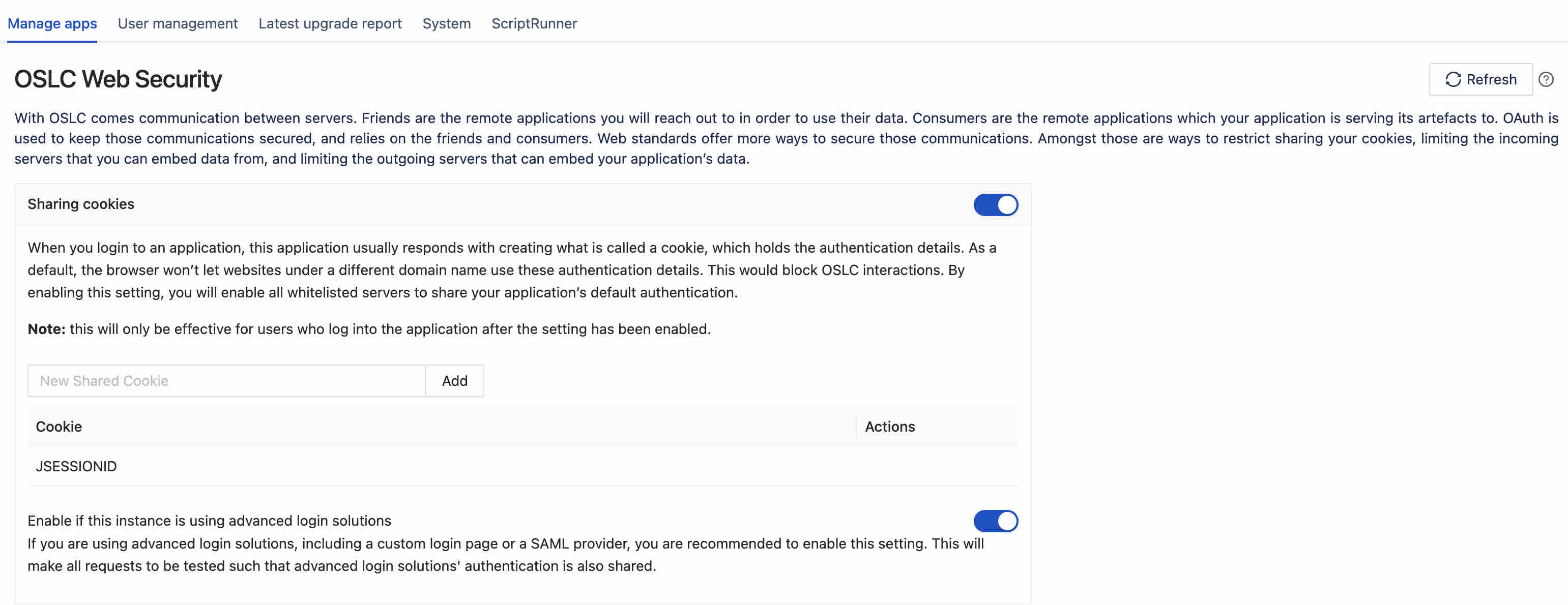
Make sure you have both the sharing cookies and advanced login solutions enabled.